Optimizing Your Educational Publishing Workflow with the Lesson Planner 2023-2024 KDP Interior
The process of creating and publishing a professional lesson planner for the academic year involves a blend of educational insight, design skill, and technical precision. For educators, content creators, and entrepreneurs looking to publish on platforms like Amazon KDP, the foundation of a successful product is a robust, adaptable interior template. The Lesson Planner 2023-2024 KDP Interior provides exactly that: a meticulously crafted, print-ready file package designed to streamline the production process from concept to final upload.
Where a Professional Interior Template Fits in Your Publishing Process
Whether you are an experienced publisher or a teacher venturing into creating your own resources, the workflow typically begins with an idea and ends with a polished product available for sale. The middle stages—design and formatting—are often the most time-consuming and technically challenging. This is the precise gap the Lesson Planner 2023-2024 KDP Interior aims to fill. It acts as the core asset in your project, eliminating the need to build a 120-page layout from scratch. Instead, you start with a structurally complete, professionally formatted foundation.
This approach shifts your focus from tedious layout tasks to the higher-value work of customizing content, tailoring the design to your brand, and ensuring pedagogical effectiveness. It fits into your process after initial conceptual planning and before the final quality check and KDP upload. By integrating this template early, you establish consistency and organization, allowing you to concentrate on the unique value your planner will offer to its users.
Key Features and Their Practical Impact on Your Workflow
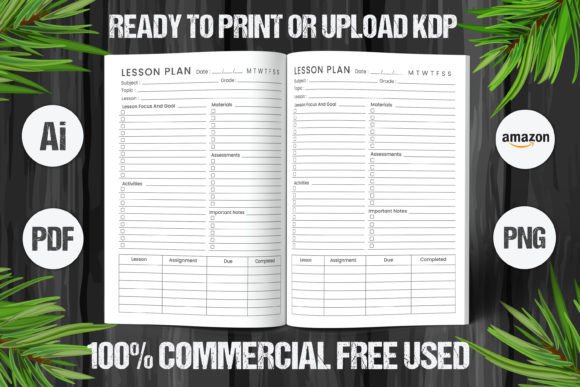
The included file suite—an editable Illustrator AI file, high-resolution PDFs, and PNGs—is designed for compatibility and efficiency. Each format serves a distinct, practical role in a creator’s workflow.
The Editable Illustrator AI File: Your Center of Customization
The fully editable AI file is the most powerful component for creators who wish to make substantial alterations. Using Adobe Illustrator, you can modify every element: colors, fonts, graphics, page structures, and section headers. This is crucial for branding. A freelance designer creating planners for multiple school districts, for example, can quickly adapt the core template to match each client’s color scheme and logo, maintaining a consistent quality while saving dozens of hours.
This level of editability also supports long-term use. The template isn’t just for one project; it can become your go-to framework for future academic year planners, with adjustments made for changing dates or improved features.
High-Resolution PDF and PNG Files: Ensuring Print-Ready Quality
The provided 120-page PDF and PNG files are set to high-resolution standards and are formatted for the standard 8.5" x 11" inch dimension with no bleed. This is a critical detail for KDP publishing. These files are essentially your final proof-ready versions. You can use them directly for upload, or, more prudently, as a reference to check the output of your edited AI file.
For a blogger or small business owner who might not have deep expertise in print specifications, these ready-made files act as a quality control benchmark. They demonstrate exactly how a properly formatted interior should look, ensuring your final product meets KDP’s technical requirements without unexpected margins or pixelation issues.
Integrating the Template into Diverse Creator Workflows
The utility of the Lesson Planner 2023-2024 KDP Interior extends across various user profiles and their unique methods.
For the Educator-Creator
A teacher designing a planner for their own classroom or to sell to colleagues has deep domain knowledge but may lack design time. Here, the template serves as a structured canvas. They can open the PDF to review the default layout—seeing how weekly planning grids, monthly calendars, attendance trackers, and notes sections are organized—and then use the editable file to insert specific school holidays, custom assessment tables, or unique goal-setting pages relevant to their pedagogy. The process becomes one of content population and light customization rather than architectural design.
For the Freelance Designer or Publisher
Professionals serving multiple clients need tools that enhance both speed and consistency. The AI file integrates seamlessly into a design software workflow alongside stock image libraries, font collections, and client asset folders. A publisher can prepare the base template, then duplicate it for different projects, saving each as a new project file. This ensures that every planner produced has the same underlying, professional structure, while the customizable surfaces allow for varied visual identities. It directly impacts efficiency and scalability of their service offerings.
For the Productivity Entrepreneur
An entrepreneur developing a suite of planning products for a niche market—such as homeschool parents or corporate trainers—can use this template as the first proven component. After adapting and publishing the 2023-2024 lesson planner successfully, they gain insight into market reception and can then apply similar template-based workflows to create complementary products like student journals or curriculum guides, leveraging the same know-how in file preparation and KDP upload processes.
Practical Implementation Tips for a Smooth Integration
To harness the full benefit of the Lesson Planner 2023-2024 KDP Interior, consider these steps for integrating it into your project plan.
First, audit the default files. Before making any edits, review all 120 pages in the PDF. Understand the flow from yearly overviews to monthly and weekly spreads. Identify pages that are perfectly suited for your needs and those that might require modification or removal. This preparation prevents disjointed edits later.
Second, define your customization scope. Decide what changes are essential. Is it only changing the year title and adding a logo? Or are you redesigning entire sections? Having a clear list guides your work in Illustrator and prevents over-customization that could undermine the template's proven layout.
Third, maintain technical compliance. When editing the AI file, always keep the core dimensions (8.5x11 inches) and no-bleed setting intact. Use the high-resolution PNG files as a visual guide to ensure your edited pages maintain crisp text and clean lines. Before final upload, generate a new PDF from your edited AI file and compare it page-by-page with the original provided PDF for any unintended formatting shifts.
Interaction with Other Tools and Resources
This interior template does not exist in isolation; it becomes part of an ecosystem of tools. It works in conjunction with:
- Design Software: Adobe Illustrator is primary, but elements can be exported for use in other programs.
- Content Resources: Your own lesson plan structures, educational standards references, or graphic assets.
- Publishing Platforms: The final PDFs are uploaded directly to Amazon KDP, interacting with its cover design tool, previewer, and pricing modules.
- Project Management: For teams, the template file can be stored in shared cloud drives like Google Drive or Dropbox, versioned for different stages of completion.
This interconnectivity means the template’s value is multiplied by your proficiency with these adjacent tools. Investing time to learn efficient Illustrator techniques, for instance, will dramatically increase the speed and quality of your customization process.
Ensuring Long-Term Usability and Consistency
A significant advantage of starting with a professional template is the establishment of consistency. For creators building a brand around educational planners, having a coherent layout and structure across products builds trust and recognizability. The Lesson Planner 2023-2024 KDP Interior provides that consistent baseline.
For long-term use, treat your customized AI file as a master template. Save a clean copy after each major project. As you move to create the 2024-2025 version, you will already have your branded styles, color palettes, and modified sections in place. The update process becomes primarily about changing dates and perhaps refining sections based on user feedback from the previous year’s edition. This iterative improvement, built on a stable foundation, is a sustainable model for ongoing publishing.
The journey from an idea for a lesson planner to a tangible, saleable product is filled with potential bottlenecks. The Lesson Planner 2023-2024 KDP Interior design package addresses the most common of these—professional layout and technical formatting—by providing a ready-to-adapt, print-ready foundation. By integrating this template into your workflow, you allocate your energy where it matters most: tailoring the planner to meet specific educational needs and building a product that stands out in both quality and utility.